Want to master KakaoTalk's Empathy Stickers? You can easily add reactions by long-pressing messages or tapping registered icons, and cancel or modify them within 7 days of the message being sent. This guide covers everything you need to know for seamless communication.
What Are KakaoTalk Empathy Stickers and Why Use Them?
KakaoTalk Empathy Stickers are a fun way to react to messages with emojis like hearts, thumbs-ups, or checks, instead of typing a full reply. They're especially useful in large group chats or open chats, helping to reduce message clutter from simple acknowledgments like 'Got it' or 'Like.' These stickers appear discreetly on the message bubble, allowing for quick and effective emotional expression without disrupting the conversation flow. Many users find this feature significantly boosts communication efficiency.
How to Use and Edit KakaoTalk Empathy Stickers
Related Articles
Using KakaoTalk Empathy Stickers is straightforward across personal, group, and open chats. To add a reaction, simply long-press the message bubble and select your desired sticker. If a sticker is already registered, you can tap it directly for a quick reaction. When someone else has already reacted, you'll see an '
How to See Who Reacted with Empathy Stickers
Ever wondered who left which reaction on a message in a busy chat? Just long-press the empathy sticker icons shown below the message bubble. This will display a list of users who reacted and the specific emojis they chose. If the list is cut off, you can scroll up to view all participants. This feature enhances clarity, letting you know exactly who expressed what sentiment towards your message.
How to Set Up KakaoTalk Quick Reactions
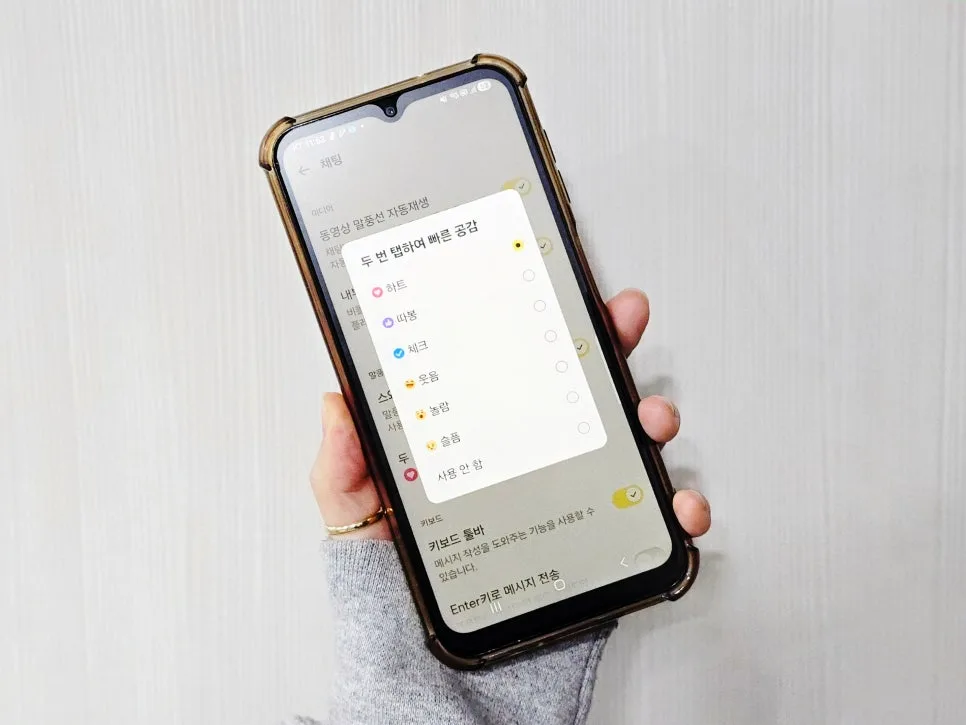
If you have a go-to reaction, setting up 'Quick Reactions' can make your messaging even faster. Navigate to Settings > Chat and enable the 'Double-tap for Quick Reaction' option, then select your preferred sticker. From then on, a quick double-tap on any message bubble will instantly send your chosen reaction. This bypasses the need to long-press and select, allowing for lightning-fast expressions, perfect for acknowledging important announcements in group chats with a quick thumbs-up.
Common Mistakes with KakaoTalk Empathy Stickers
The most frequent slip-ups involve trying to use stickers on messages older than 7 days or being unsure how to remove an accidental reaction. Remember, the 7-day window is crucial for this feature. If you mistakenly tap the wrong emoji, long-press it to access the reaction list and either delete it or select a different one. If the empathy sticker function isn't appearing, ensure your KakaoTalk app is updated to the latest version and check the message's age. Understanding these points will help you use Empathy Stickers like a pro.
Have more questions about KakaoTalk Empathy Stickers? Check the original source for details.