Learn how to create your own custom Megabox photocards, including pricing and where to print them, based on firsthand experience. This guide is perfect for K-culture fans looking to preserve movie memories in a unique way.
What Are Megabox Photocards and How Do You Make Them?
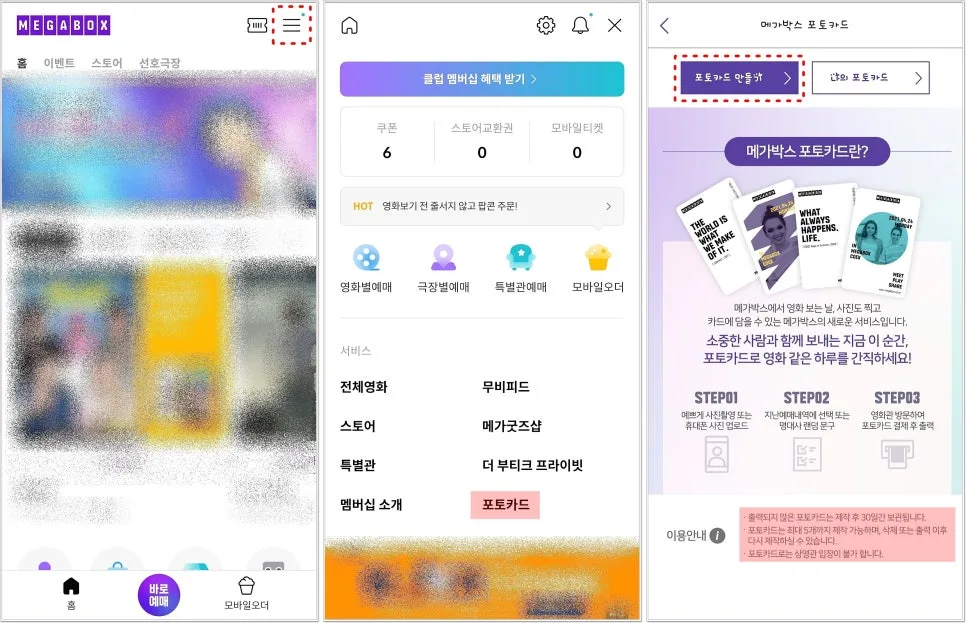
Megabox photocards are a fantastic way for fans to commemorate their movie-going experiences. To create one, you'll need to use the Megabox mobile app. Navigate to the 'Photocard' service, accessible via the menu or directly from your mobile ticket if you have a recent movie reservation. Once you select 'Create Photocard,' you can begin customizing the front. You can either take a new photo or upload one from your gallery. The app offers editing tools to adjust the size, angle, apply effects, and modify brightness, allowing you to perfectly frame your chosen image. You can even pinch to zoom and rotate the photo. Additionally, a 'Text Input' feature lets you add personal notes or movie-related quotes. After finalizing the front, proceed to customize the back. Here, you can automatically insert basic movie details like the title, theater, screen number, date, and time by selecting 'Choose from viewing history.' Alternatively, opt for the 'Display with movie quotes' feature to have a random, memorable line from the film printed on the back, adding an element of surprise.
What Information Goes on the Back and Where Can You Print Them?
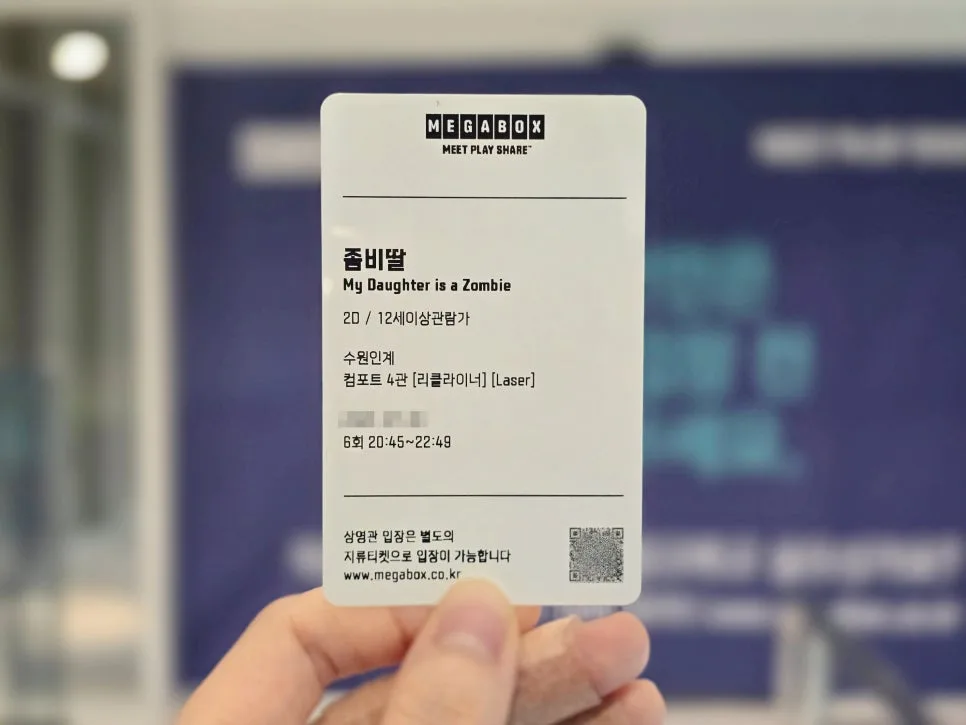
The back of your Megabox photocard will typically display essential details of your movie viewing, such as the film's title, the Megabox location, screen number, date, and time. Choosing the 'Display with movie quotes' option adds a fun element of anticipation, as you won't know which iconic line will be printed until you receive your card. After completing all edits, you'll see a preview of your photocard, including the QR code, front, and back. A crucial step is checking the 'Printable Locations' to find Megabox theaters equipped for photocard printing. It's highly recommended to verify this beforehand to avoid a wasted trip. Currently, you can create up to five photocards per session, and they must be printed within 30 days of creation; otherwise, they will be automatically discarded.
How Do You Print Megabox Photocards and What's the Cost?
Printing your custom Megabox photocards is a self-service process using the kiosks available inside Megabox theaters. On the kiosk screen, select the 'Photocard' menu and then choose the 'Print' option. Next, open your Megabox app, go to 'Mobile Ticket' → 'Photocard' → 'My Photocard,' and select the card you wish to print. Scan the QR code displayed on your app at the kiosk's reader. A 16-digit number will automatically populate, and a preview of your photocard will appear. Confirm the details and proceed to select the quantity. The cost for each Megabox photocard is ₩1,000 (approximately $0.75 USD), and you can print up to eight cards at once. Be aware that printing a single card can take a little time, so if you plan to print multiple, consider the queue and ensure you have enough time.
What Are the Key Considerations When Making Megabox Photocards?
When creating and printing your Megabox photocards, keep a few important points in mind. Firstly, remember that you can create a maximum of five photocards, and they expire 30 days after creation if not printed. So, make sure to print your movie memories within this timeframe. Secondly, the printing process is self-service via kiosks. Familiarizing yourself with the kiosk operation beforehand can make the process smoother and quicker, especially if there's a line. Being considerate of other moviegoers is key. Thirdly, for the best results and to ensure your photo fills the card nicely, use a 9:16 aspect ratio for your front-side image. Finally, always check the Megabox app for the list of printable locations before you go. Not all Megabox theaters offer photocard printing services, so confirming this in advance will save you potential disappointment.
For more details, check the original source below.