Opening a business account with Kakao Bank in 2026 is a streamlined process, requiring only your ID and business registration number for online application. Unlike traditional banks, Kakao Bank offers high transaction limits, with mobile transfers up to 500 million KRW (approx. $375,000 USD) daily and ATM transfers up to 30 million KRW (approx. $22,500 USD) daily, making it a convenient choice for entrepreneurs.
What You Need to Open a Kakao Bank Business Account
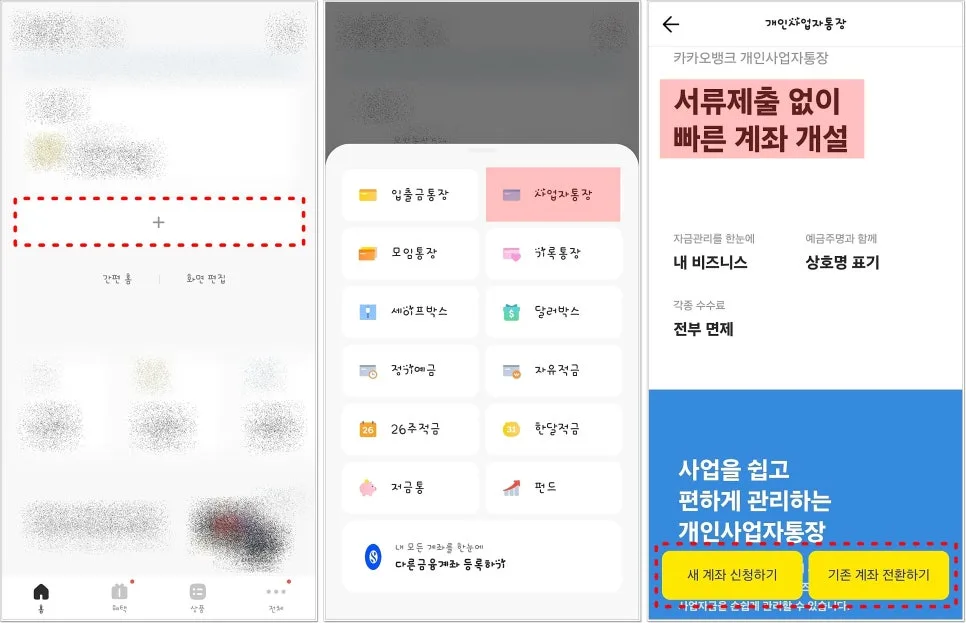
To open a Kakao Bank business account, you'll need your South Korean national ID (like a resident registration card, driver's license, or passport) and your business registration number. The process is entirely online via the Kakao Bank app. After selecting 'Business Account' from the app's home screen, choose between opening a new account or converting an existing one. You'll then agree to terms and conditions, set a PIN, and specify your account's purpose (business fund management). Ensure your ID is clearly photographed, avoiding glare or obstruction, as this is crucial for verification. Once submitted and verified, your account will be opened without the need for extensive paperwork or in-person visits.
Kakao Bank Business Account Transfer Limits and Fee Waivers
Kakao Bank's business accounts offer generous transaction limits designed for active businesses. Mobile transfers are capped at 500 million KRW (approximately $375,000 USD) per day and 100 million KRW (approximately $75,000 USD) per transaction. For ATM transactions, the daily limit is 30 million KRW (approximately $22,500 USD), with a per-transaction limit of 1 million KRW (approximately $750 USD). A significant benefit is the waiver of various fees, including transfer fees, ATM usage fees, and certificate issuance fees, which can substantially reduce operational costs for small businesses. The account also displays both your name and business name, enhancing clarity in transactions.
Important Considerations When Opening a Kakao Bank Business Account
The most critical step during the Kakao Bank business account opening process is the identity verification via ID scan. Poor lighting or reflections can obscure details on your ID, leading to verification failures and requiring you to restart the application. It's essential to take a clear, well-lit photo of your ID, ensuring all information is legible and no part of the ID is cut off. Accurately selecting the account's intended use (e.g., business fund management) and entering your correct business registration number are also vital to prevent delays or errors. Double-checking all entered information before final submission is highly recommended.
Kakao Bank Business Account Notifications and Debit Card Perks
Upon successful account opening, you can customize real-time transaction notifications through the Kakao Bank app. Choose between app push notifications, KakaoTalk messages, or SMS alerts, and decide whether to display your balance with each notification for effective fund management. Additionally, Kakao Bank offers a debit card specifically for personal business owners, providing 0.3% cashback on general lifestyle purchases and a 3% cashback on business-related expenses. You can apply for this debit card directly through the account's menu in the app. These features are designed to enhance the convenience and financial management capabilities for entrepreneurs.
For more details, check the Kakao Bank app.