Looking to cancel your Melon music subscription? This guide breaks down how to cancel your recurring payments, process refunds, and manage your subscription for 2026. We'll cover the exact steps for both Android and iPhone users, making the process clear and straightforward.
Canceling Your Melon Subscription on Android
If you're an Android user, canceling your recurring Melon subscription is quite simple. You can initiate the cancellation directly within the Melon app. If you subscribed less than 7 days ago and haven't used the service, you may be eligible for an immediate cancellation and full refund. For users who have already started using their subscription period, you'll need to request cancellation through customer support to process a refund for the remaining unused days. Based on user experience, navigating to the 'Change/Cancel Subscription' menu within the app usually completes the process in just a few clicks. Keep in mind that refund policies can vary based on your usage duration.
Melon Subscription Cancellation for iPhone Users
For iPhone users, the cancellation process depends on how you initially subscribed. If you made an in-app purchase through the Apple App Store, you cannot cancel directly within the Melon app. Instead, you'll need to log in to your Apple ID, navigate to the problem reporting page, and submit a refund request there. If you subscribed via the Melon website or a PC, the process is different. Log in to the official Melon website, go to 'My Info,' then 'Subscription/Coupon/Cash,' and select 'Change/Cancel Subscription.' Finally, click 'Cancel Subscription' and then 'Abandon Benefits' to complete the cancellation. I found that using a PC for web-based subscriptions made the process much smoother.
Melon Subscription Mid-Term Cancellation and Refund Policy
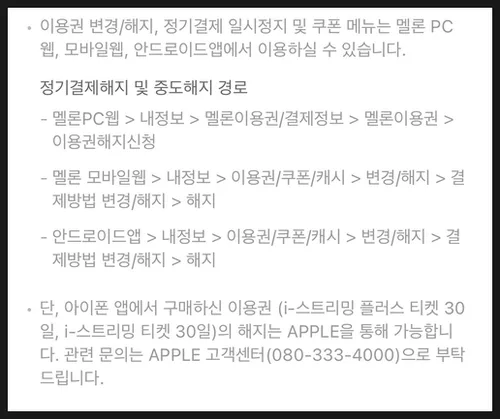
When you cancel your Melon subscription mid-term, you are generally eligible for a refund for the remaining unused portion of your subscription period. The refund amount is calculated by subtracting the cost of the days you've already used from your total payment. For instance, if you have a 30-day subscription and cancel after 10 days, you'll receive a refund for the remaining 20 days. If you cancel within 7 days of purchase and haven't used any of the service, you may be eligible for a full refund. Refund requests can be submitted through Melon's customer service, and typically, refunds are processed within 3-5 business days. While the process is generally clear, it can sometimes feel complex, so it's advisable to have your usage details ready when contacting customer support.
Common Questions and Important Notes About Melon Cancellation
Many users wonder if they can continue using the service until the end of their paid period after canceling the automatic renewal. The answer is yes; you can still access Melon's services until your current billing cycle ends. However, it's important to note that any promotional offers or discounts you received during your initial subscription may not be available if you decide to re-subscribe later. Always check the current promotions when you plan to renew. Additionally, for iPhone in-app purchases, remember that Apple's refund policies will apply, which might differ from Melon's standard terms.
For more detailed information on canceling your Melon subscription, please visit the Melon customer center.