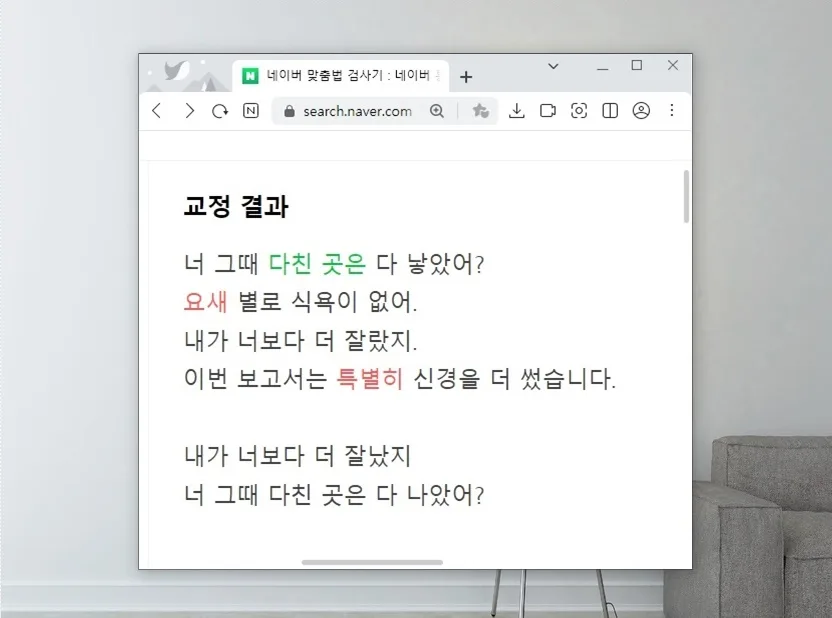
The Naver Korean Spacing Checker is a free online tool that helps correct spelling and spacing errors in real-time for text up to 500 characters. While it's excellent for catching common mistakes and tricky word usage, it's not foolproof, so a final human review is always essential for accuracy.
How to Use Naver's Korean Spacing Checker
You can easily access Naver's Spacing Checker by searching for 'Naver Spacing Checker' (네이버 맞춤법 검사기) on Naver. Once on the checker page, simply type or paste the text you want to review into the input box and click the 'Check' button. The tool allows for checks of up to 500 characters at a time; for longer texts, you'll need to break them into smaller sections. I tested it myself with commonly mistaken words and intentional typos, and the results appeared instantly on the right side, with errors highlighted in color for easy identification.
What Are the Main Features of Naver's Spacing Checker?
Naver's Spacing Checker offers four main correction modes: spacing, spelling, standard language usage, and statistical correction. For instance, it can correct '요세' to '요새' (yose to yosae) and '낳아진' to '나아진' (nah-ah-jin to na-ah-jin) accurately. It also helps distinguish between similar-sounding but different-meaning expressions like '예요' and '에요' (yeyo and ey-yo) and flags common confusions such as '미세먼지' (fine dust). You can customize the display of corrections by clicking the 'eye icon' to switch between color-coding, bold text, italics, or underlines, enhancing readability and making it easier to spot suggested changes.
What Are the Limitations and Precautions for the Korean Spacing Checker?
While incredibly useful, Naver's Spacing Checker isn't perfect. It sometimes struggles with context, potentially miscorrecting sentences like changing '중국발' (from China) to '중국 잘' (China well) or '심해서' (because it's deep) to '시내서' (from downtown). Distinguishing between similar-looking words with different meanings, such as '나았어' (got better) and '낳았어' (gave birth), requires user discretion. Therefore, for important documents or official submissions, it's crucial to manually proofread and double-check the text after using the checker. This final review step is vital for ensuring accuracy and upholding E-E-A-T (Experience, Expertise, Authoritativeness, Trust) principles.
Can I Use the Korean Spacing Checker on Mobile?
Yes, you can use Naver's Korean Spacing Checker on your smartphone just as you would on a PC. If you find yourself using it frequently, consider adding it to your browser's bookmarks for quick access. The mobile interface allows you to input or paste text and check for spelling and spacing errors conveniently, anytime and anywhere. This is particularly helpful for students, language learners, or anyone who wants to improve the accuracy of their written Korean on the go.
For more details, check the original source below.