McDonald's loyalty points offer a great way to save on your favorite meals, but a significant program update is coming in 2026. This guide, based on real user experience, breaks down how to use your points effectively before the changes take effect on April 13, 2026. With fewer redemption options and a potential 500-point increase for popular items, now is the time to maximize your rewards.
How to Use McDonald's Points Before the 2026 Update
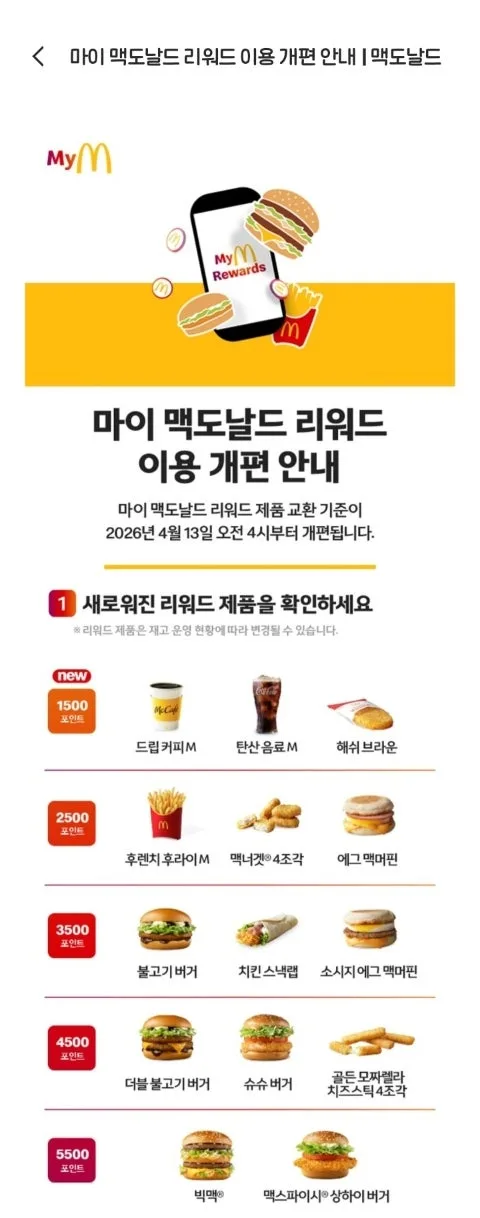
McDonald's is revamping its loyalty points system starting April 13, 2026. The key changes include a reduction in the variety of products available for redemption and an increase of approximately 500 points for existing items. For instance, an item previously redeemable for 3,000 points might require 3,500 points after the update. As someone who recently used my 3,000 points, I found it beneficial to redeem them before these changes. This guide will walk you through using your points via the McDonald's app and kiosks, offering practical tips for a smooth redemption process.
How to Redeem McDonald's Points Using the App
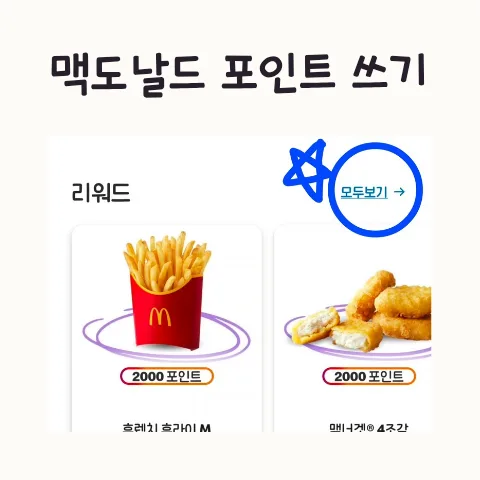
Redeeming your McDonald's points through the app is straightforward. First, open the McDonald's app and navigate to the 'Coupons' section. From there, select 'Rewards' and then 'View All' to see the list of items available for point redemption. Choose the item you want, tap the 'Redeem' button, and select 'Use at Store.' You'll then be prompted to confirm redemption again, which generates a barcode on your screen. Present this barcode to the cashier or scan it at the kiosk to complete your point-based purchase. I found this method to be quite convenient for managing and using my rewards.
How to Use McDonald's Points at the Kiosk
To use your McDonald's points at a self-service kiosk, start by tapping the barcode icon on the screen. Then, scan the redemption barcode generated from your McDonald's app. The kiosk will indicate the scan's success and prompt you to select any necessary utensils like spoons or forks. After adding the item to your cart, proceed to checkout by tapping 'Pay.' Ensure the total amount due shows as $0.00, confirming your points have covered the cost. Finally, tap 'Complete Order' to finalize your transaction. Occasionally, kiosk transactions might experience slight delays due to internet connectivity, but patience or seeking assistance from a staff member usually resolves this.
What Changes with the McDonald's Points System in 2026?
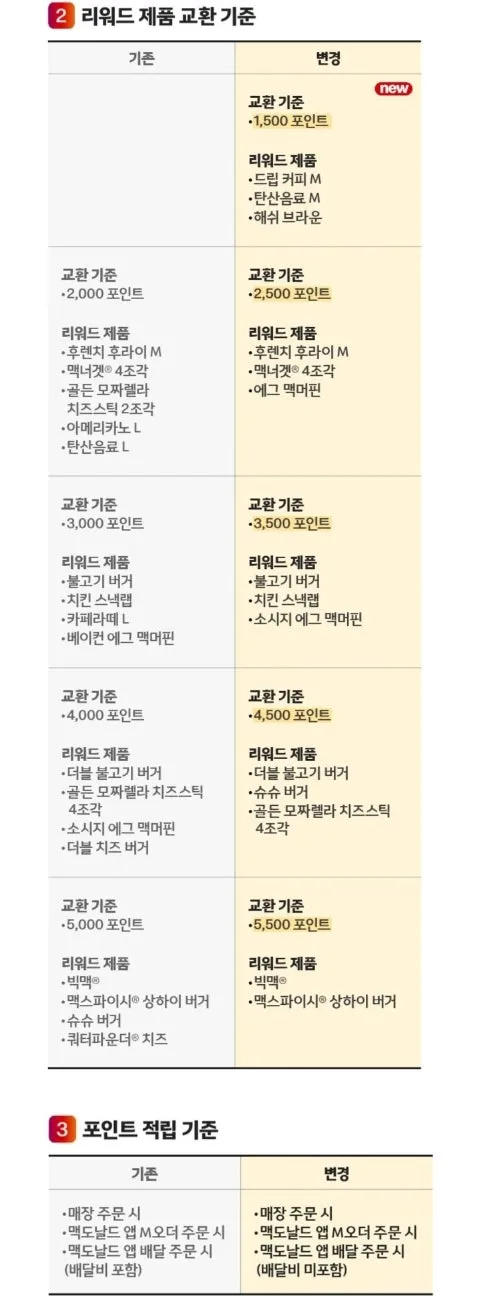
The upcoming changes to the McDonald's points system, effective April 13, 2026, will impact how customers redeem their rewards. The primary adjustments involve a narrowed selection of redeemable products and a 500-point increase for many existing redemption options. This means that items you might currently get for a certain point value will cost more after the update. It's advisable for customers to check their current point balance and consider redeeming them for desired items before the new system goes live. Familiarizing yourself with the app or kiosk redemption process beforehand can also help ease the transition.
What Should You Know Before Using McDonald's Points?
When using McDonald's points, keep a few things in mind. Points function like cash for eligible items but may not apply to all promotional offers or limited-time menu items. The redemption process, especially at kiosks, can sometimes be a bit complex for first-time users, so don't hesitate to ask for help from a crew member. Crucially, with the system update on April 13, 2026, which will increase point requirements and limit redemption choices, it's highly recommended to use your points before this date. Always double-check your final order on the kiosk or with the cashier to confirm that the payment amount is indeed zero after applying your points.
For more details on using McDonald's points, check the original source below.